Research-led
Every main screen traces back to a ranked user task.
Concept project: a sample build that shows how we approach this kind of product. The client, features and figures are illustrative.
UI/UX design · Research to prototype · Smart home · IoT
A UX case study: one calm app to control lights, climate, security and routines across every device in the home.
Overview
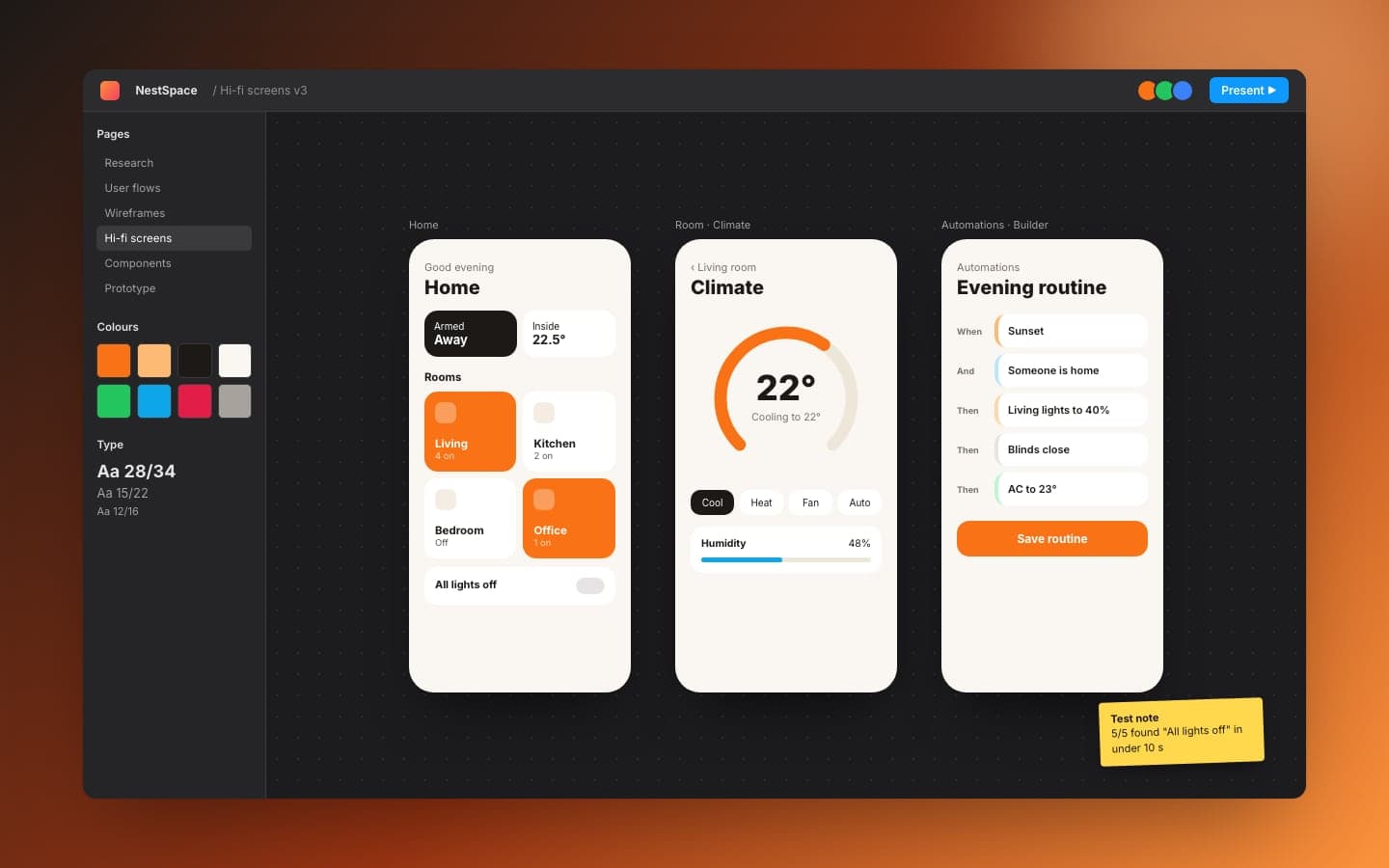
Smart-home owners juggle a separate app for every device brand. Turning off all the lights means opening three apps, and automations are buried in settings few people find. A device brand wanted one app that makes the home feel simple again. This project covers the full UX process, from research to a tested, clickable prototype and a design system developers can build from.
Problems & fixes
Pick a problem to see what was wrong, what we built and what changed.
Lights, climate and cameras each had their own app, layout and vocabulary.
A competitive review of the main device apps, then an information architecture built around four places: Home, Rooms, Automations and Profile.
Every device is reachable from one app in at most two taps.
Impact
How it works
Click any part of the system, or play the flow from start to finish.
Personas and journey maps for the most frequent smart-home tasks.
Every main screen traces back to a ranked user task.
Automations read as plain sentences: When, And, Then.
Contrast, tap targets and states checked against WCAG guidance.
Timeline
Tech stack
Tell us what you're building. A senior engineer, not a salesperson, replies within one business day.
Start a project